
TL;DR
- Stripe Connect provides certain payment methods that pensopay makes available as part of its solution.
- You are responsible for checking your Stripe Dashboard, responding to emails from Stripe, and handling disputes promptly.
- Stripe, not pensopay, manages key aspects of your account, including risk assessments and access to payment methods.
- Failing to follow up on requests from Stripe can lead to paused payouts or other account issues.
If you use Stripe Connect through pensopay, for example to accept Swish or Klarna payments, you are responsible for monitoring your Stripe account. To help avoid interrupted payouts or financial losses:
- Check your Stripe Dashboard regularly for “Actions required.”
- Respond promptly to emails from Stripe.
- Handle disputes directly in Stripe as soon as they appear.
Introduction
When you use Stripe Connect through pensopay, you enter into an agreement directly with Stripe. Stripe alone decides whether it can support your business and which payment methods you can access.
Stripe regularly reviews your business and reserves the right to change your terms if its assessment of your business risk changes.
Three ways to keep your account running smoothly
To help prevent disruptions to your Stripe account and payment methods, follow these three recommendations:
- Check your Stripe Dashboard regularly
Sign in to your Stripe dashboard regularly. Stripe will notify you of any actions you need to take under “Actions required.” Respond to these requests to help avoid paused payouts or funds being held in reserve.
- Keep an eye on your inbox
Check the email address linked to your Stripe account regularly. Stripe often sends important requests that require a response at short notice. - Monitor your disputes
Check the Payments > Disputes section of your Stripe Dashboard regularly. This is where you will find customer disputes and refund requests that need your attention.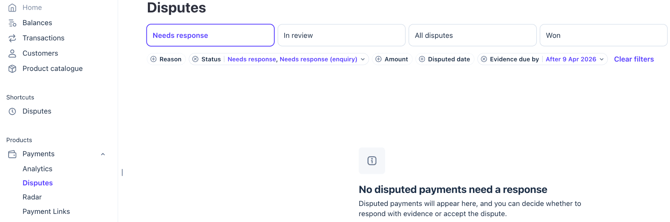
Why does this matter?
If you do not respond to requests or disputes in time, it can affect your ability to continue using services through Stripe Connect.
- Account restrictions: Stripe may restrict your ability to accept payments or receive payouts.
- Financial losses: If you do not respond to a dispute, the disputed amount is automatically returned to the customer. This can mean losing funds even if you believe the dispute is unjustified.
- Account closure: In serious cases, Stripe may end your agreement and stop processing transactions if it considers the risk too high.
If you accept Klarna payments: It is especially important to handle disputes promptly when accepting payments through Klarna.
Understanding Stripe’s currency conversion fees
Stripe processes payments made using payment methods provided through Stripe Connect, so Stripe’s foreign exchange (FX) and currency conversion fees apply.
The fees are as follows:
- 0%: The payout currency matches both your bank account currency and the local currency of the country where your bank is located.
- Example: You receive DKK into a DKK account held at a Danish bank.
- 1%: The payout currency matches your bank account currency, but not the local currency of the country where your bank is located.
- Example: You receive SEK into a SEK account held at a Danish bank.
- 2%: The payout currency matches neither your bank account currency nor the local currency of the country where your bank is located.
- Example: You receive SEK into a DKK account held at a Danish bank.
Please note: For EUR payouts, the bank’s location does not affect the fee. The fee is 0% if no currency conversion is needed, or 2% if currency conversion is required.
For more information about Stripe Connect through pensopay, see our guide to getting started with Stripe Connect.
We hope you found this helpful! If you have any questions, please contact our support team:
Email: support@pensopay.com
Phone: 77 34 43 88
-You can also reach us via chat :)